Published on Jun 25, 2025
- This article is a simplified version of the paper: Document Object Model for IoT, Building IoT Systems with HTML and JavaScript and its addendum..)
What if creating interactive physical-world applications was as simple as building a website?
You can, by using HTML and JavaScript.
Some physical-world systems today are built by connecting low-level components: motion_detector_003 talks to relay_026, which controls LED_strip_012. This approach works, but it creates several problems:
- Lack of meaning erodes understandability: The system description is done naming technical components, what is actually there (a collection of sensors and actuators), instead of representing what is perceived by the user (e.g., a perfume bottle, a video, a room, a door). In such a structure, the hierarchy may not accurately reflect the relationships between elements. The structure may be correct, but its lack of semantic structure erodes understandability.
- Rigid, non-standard programming raises the barrier to entry and makes maintainability difficult: Systems that rigidly map inputs to outputs often become hard to modify and debug, remaining accessible only to specialists, while millions of web developers and AI agents, who could contribute valuable skills, stay on the sidelines.
What if we could build physical-world systems the same way we build web pages? We can use HTML to *describe physical-world systems *and JavaScript to script their behavior. The Document Object Model (DOM) already provides everything we need: a standardized API for manipulating structured documents, event handling, and dynamic updates. We just need to extend it to the physical world.
This is the core idea behind DOMIoT (Document Object Model for IoT).
Imagine walking into a department store and approaching an elegant perfume display podium. A large screen loops through beautiful commercials while four premium perfume bottles sit on illuminated tiles.
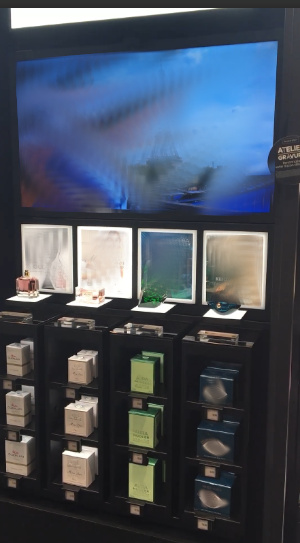
Podium on display unit. Video and brand elements have been blurred for publication.
As you pick up a bottle of your favorite brand, something happens: the display instantly responds. The video screen jumps to that brand’s commercial, while all other displays dim, leaving only your chosen perfume’s tile and storage column brilliantly lit.
Place the bottle back down, and the entire display returns to its welcoming state: all lights restored, video continuing its endless loop, ready for the next interaction.
Behind this retail experience lies surprisingly familiar code, the same HTML and JavaScript you’d use to build a website, only now with items, tiles and columns of cubbies instead of divs:
<html>
    <!-- IoT Bindings -->
    <iot-ibits-item-binding id="perfumeBinding" location="/dev/iohubx24-sim0"></iot-ibits-item-binding>
    <iot-obits-color-binding id="tileColorBinding" channels-per-element="1" colors-channel="white" location="/dev/ohubx24-sim0"></iot-obits-color-binding>
    <iot-obits-color-binding id="columnColorBinding" channels-per-element="1" colors-channel="white" location="/dev/ohubx24-sim1"></iot-obits-color-binding>
    <iot-iotext-video-binding id="videoBinding" location="/dev/video-sim0"></iot-iotext-video-binding>

    <!-- Main Display Unit Structure -->
    <iot-display-unit id="perfumeDisplayUnit">

        <!-- Video Screen for Commercials -->
        <iot-video id="commercialScreen" src="/commercials/all-perfumes.mp4" autoplay loop binding="videoBinding"></iot-video>

        <!-- Main Podium with 4 Tiles -->
        <iot-podium id="mainPodium">

            <!-- Tile 1 - Brand1 -->
            <iot-tile id="tile1" style="color:white;" binding="tileColorBinding">
                <iot-item id="perfume1" brand="Brand1" commercial-start-time="0" binding="perfumeBinding"></iot-item>
            </iot-tile>

            <!-- Tile 2 - Brand2 -->
            <iot-tile id="tile2" style="color:white;" binding="tileColorBinding">
                <iot-item id="perfume2" brand="Brand2" commercial-start-time="5" binding="perfumeBinding"></iot-item>
            </iot-tile>

            <!-- Tile 3 - Brand3 -->
            <iot-tile id="tile3" style="color:white;" binding="tileColorBinding">
                <iot-item id="perfume3" brand="Brand3" commercial-start-time="12.3" binding="perfumeBinding"></iot-item>
            </iot-tile>

            <!-- Tile 4 - Brand4 -->
            <iot-tile id="tile4" style="color:white;" binding="tileColorBinding">
                <iot-item id="perfume4" brand="Brand4" commercial-start-time="16.5" binding="perfumeBinding"></iot-item>
            </iot-tile>

        </iot-podium>

        <!-- Storage Columns beneath each Tile -->

        <!-- Column 1 - Brand1 Storage -->
        <iot-column id="column1" style="color:white;" binding="columnColorBinding">
            <iot-cubby id="cubby1-1"></iot-cubby>
            <iot-cubby id="cubby1-2"></iot-cubby>
            <iot-cubby id="cubby1-3"></iot-cubby>
        </iot-column>

        <!-- Column 2 - Brand2 Storage -->
        <iot-column id="column2" style="color:white;" binding="columnColorBinding">
            <iot-cubby id="cubby2-1"></iot-cubby>
            <iot-cubby id="cubby2-2"></iot-cubby>
            <iot-cubby id="cubby2-3"></iot-cubby>
        </iot-column>

        <!-- Column 3 - Brand3 Storage -->
        <iot-column id="column3" style="color:white;" binding="columnColorBinding">
            <iot-cubby id="cubby3-1"></iot-cubby>
            <iot-cubby id="cubby3-2"></iot-cubby>
            <iot-cubby id="cubby3-3"></iot-cubby>
        </iot-column>

        <!-- Column 4 - Brand4 Storage -->
        <iot-column id="column4" style="color:white;" binding="columnColorBinding">
            <iot-cubby id="cubby4-1"></iot-cubby>
            <iot-cubby id="cubby4-2"></iot-cubby>
            <iot-cubby id="cubby4-3"></iot-cubby>
        </iot-column>

    </iot-display-unit>

</html>
Above was the description of the physical space in HTML, bellow is the behavior of the system scripted in JavaScript:
// State management
let lastPickedUp = null; // Track the most recently picked up item
let lightTimeout = null; // Track the 15-second timeout

// Get references to elements
const commercialScreen = document.getElementById('commercialScreen');
const tiles = document.querySelectorAll('#perfumeDisplayUnit iot-tile');
const columns = document.querySelectorAll('#perfumeDisplayUnit iot-column');
const perfumes = document.querySelectorAll('#perfumeDisplayUnit iot-item');

// Helper function to turn on all tile lights
function turnOnAllTileLights() {
    for (let i = 0; i < tiles.length; i++) {
        tiles[i].style.setProperty('color', 'white');
        columns[i].style.setProperty('color', 'white');
    }
}

// Helper function to return to default state
function returnToDefaultState() {
    turnOnAllTileLights();
    lastPickedUp = null;

    // Video continues playing in loop - no need to change src or reload
    console.log('Returned to default state - all lights on, video continues looping');
}

// Helper function to selectively illuminate for a specific perfume
function illuminateForPerfume(activeIndex) {

    for (let i = 0; i < tiles.length; i++) {
        const tile = tiles[i];
        const column = columns[i];
        if (i == activeIndex) {
            tile.style.setProperty('color', 'white');
            column.style.setProperty('color', 'white');
            continue;
        }
        tile.style.setProperty('color', 'black');
        column.style.setProperty('color', 'black');
    }
}

// Helper function to start/restart the 15-second timeout
function startLightTimeout() {
    // Clear any existing timeout
    if (lightTimeout) {
        clearTimeout(lightTimeout);
    }

    // Set new timeout for 8 seconds
    lightTimeout = setTimeout(() => {
        if (lastPickedUp) {
            console.log('8 seconds elapsed since last pickup - turning all lights on');
            returnToDefaultState();
        }
    }, 8000);
}

// Handle pickup events
perfumes.forEach((perfume, index) => {
    perfume.addEventListener('pickup', (event) => {
        const brand = perfume.getAttribute('brand');
        console.log(`Perfume ${index + 1} (${brand}) picked up`);

        // Set as the last picked up item
        lastPickedUp = perfume;

        // Selectively turn off other tiles and columns, keep this one illuminated
        illuminateForPerfume(index);

        // Seek to the commercial start time for this perfume
        const commercialStartTime = parseFloat(perfume.getAttribute('commercial-start-time'));
        commercialScreen.currentTime = commercialStartTime;

        // Start the 15-second timeout
        startLightTimeout();

        console.log(`Seeking to commercial start time: ${commercialStartTime} seconds for ${brand}`);
    });
});

// Handle putdown events
perfumes.forEach((perfume, index) => {
    perfume.addEventListener('putdown', (event) => {
        const brand = perfume.getAttribute('brand');
        console.log(`Perfume ${index + 1} (${brand}) put down`);

        // Only process if this was the last picked up item
        if (lastPickedUp === perfume) {
            // Clear timeout and return to default state (turn all lights on)
            if (lightTimeout) {
                clearTimeout(lightTimeout);
                lightTimeout = null;
            }
            returnToDefaultState();
            console.log('Last perfume put down - returning to default state');
        } else {
            console.log('Not the last picked up perfume - ignoring putdown');
        }
    });
});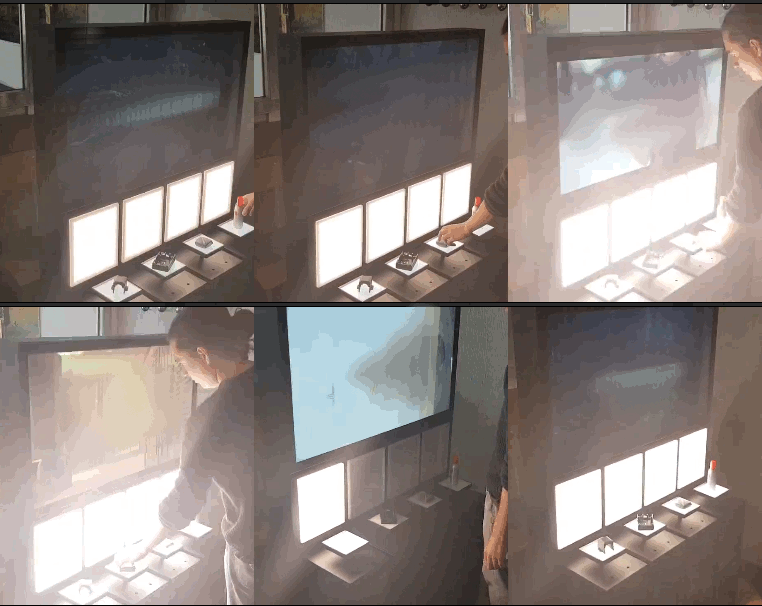
Lights and video reacting to item pickup/putdown. Video has been blurred for publication.
Notice what’s happening here:
- We are using HTML to describe physical objects and spaces: using meaningful elements: , , , , , etc. The document reads like a blueprint of the actual display unit.
- We are using JavaScript to script the physical system behavior using familiar DOM methods: addEventListener for listening to pickup and putdown events, setProperty to change the color (light) of the tiles and cubbies, and direct property assignment like commercialScreen.currentTime to control video playback.
The code tells a story of customer interaction rather than technical implementation. You’re describing what happens when someone picks up a perfume bottle, not dealing with hardware protocols or driver interfaces.
It’s easy to imagine how, with just a few lines of JavaScript, we can now program a light animation, move a product, or integrate a touchscreen that allows the customer to interact.
You can find the example above here.
General-purpose AI models have been extensively trained on HTML and web-based JavaScript, as well as dialogues and literature. The example above was entirely generated by an AI agent.
When an object detection software using a camera detects an item pickup a binding receives this information and dispatch a pickup event on the item, an event that can be listened using the addEventListener method.
When you change a CSS property like color on a tile or column, a binding automatically translates this into the appropriate signals for your LED controllers. Similarly, when you set currentTime on the video element, the system sends the corresponding command to the video player.
Bindings handle the translation between your high-level intentions (“Light up the tile of the picked-up item”) and low-level hardware commands (“send signal 1 to driver ohubx24”). This separation lets you focus on behavior and user experience.
<iot-ibits-item-binding id="perfumeBinding" location="/dev/iohubx24-sim0"></iot-ibits-item-binding>Traditional IoT development forces you to think in terms of hardware components. HTML and DOM trees encourage thinking in terms of meaningful concepts:
- Instead of “relay_026 controls LED_strip_012,” you write “tile changes color”.
- Instead of “detector_003 triggers event,” you write “item has been picked-up”.
- Instead of connecting sensors to actuators, you describe interactions between semantic elements.
This semantic approach makes systems more understandable to humans, easier to maintain, and also interpretable by AI agents trained on web technologies, as well as dialogues and literature. Notably, the example above was entirely generated by an AI agent. In a first phase, the agent was given access to directories containing collections of HTML elements for retail use, available bindings, and drivers, along with an English description of the display unit. In a second phase, a description of the desired behavior was provided using English.
The following outlines some of the potential offered by this approach.
- It is possible to interconnect web applications with IoT elements within the same HTML structure and script.
- Already existent JavaScript tools and libraries are fully compatible with the approach presented.
- Behavior can be generated dynamically by programs or general-purpose AI models.
- Consider the message: “I’m coming home. You can start the washing machine. When I’m five minutes from home, please prepare coffee. When I open the door, I want a relaxing scenario.” In this context, elements such as person, house, washing-machine, coffee-machine, lamp, and audio are semantically meaningful and interpretable by agents. AI agents can not only execute simple commands, but also script, execute, memorize, imagine and improve scenarios over time.
- Events can be sent over the internet to an event broker for use in analytics, metrics, or statistical studies.
The beauty of this approach lies in its simplicity. We’re not inventing new technologies or APIs. We’re extending widely-adopted web standards to physical systems. This means lower learning curves, better tooling support, and a vast community of developers who can contribute immediately.
If you know web development even as an amateur, you already have most of the skills you need. The same methods you use daily to code web pages work in DOMIoT. The main difference? Instead of updating web page content, you’re updating the physical world.
Start building physical world applications doesn’t have to be complex. Think of a simple interactive physical system you’d like to create, describe it in HTML using semantic elements, then script the behavior in JavaScript. You’ll be amazed how naturally web development patterns translate to physical systems.
Links to get started:
jsdomiot-kickstart is a complete setup script for DOMIoT (Document Object Model for IoT) on Linux systems. Simply run a script, and the entire setup will be installed for you.
Examples retail and hotel examples.