A lightweight, type-safe, PaddlePaddle PP-DocLayout implementation in Bun/Node.js for document layout analysis in JavaScript environments.
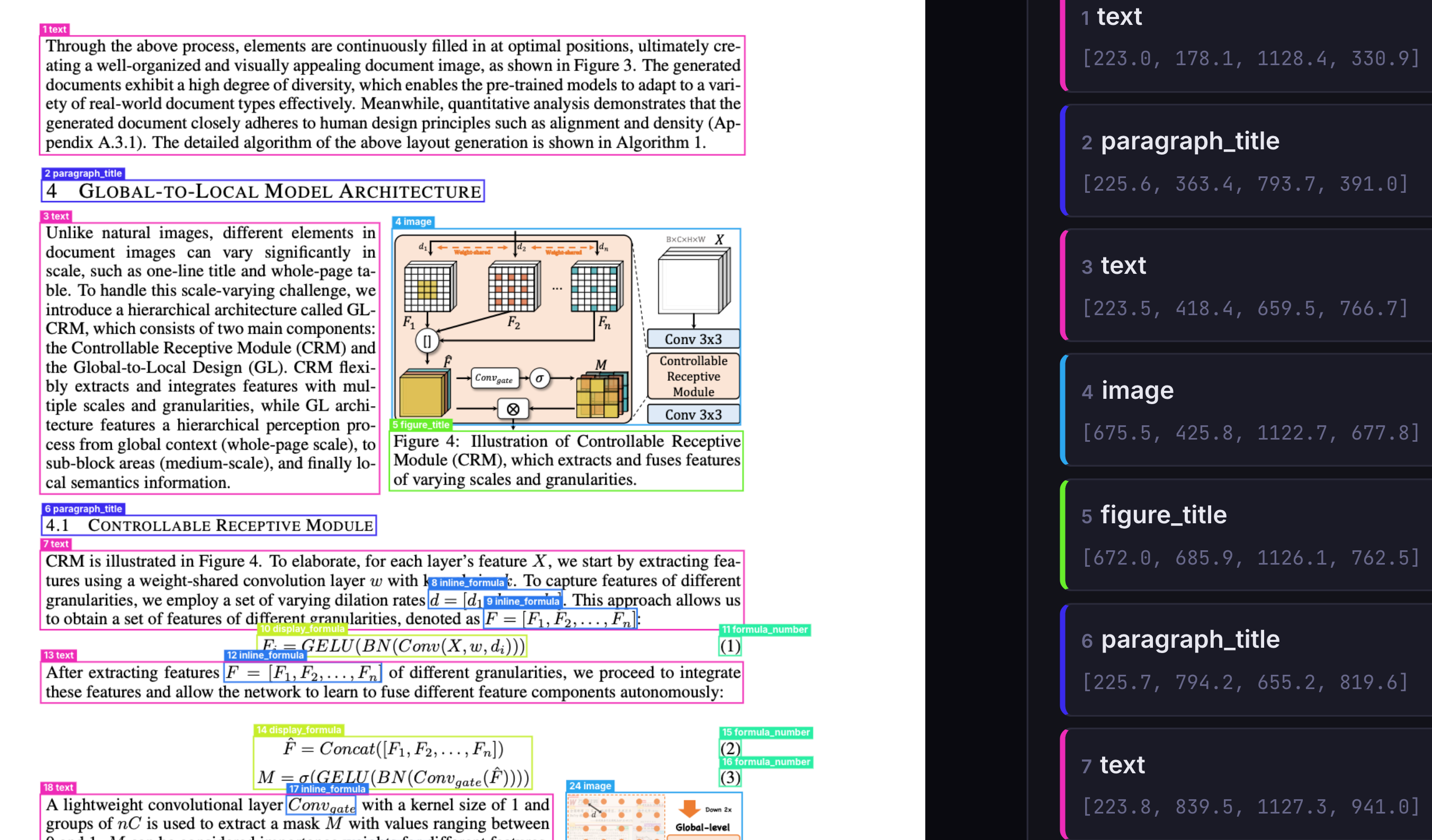
Layout analysis should be as easy as:
import { DocLayoutService } from "ppu-doclayout";

const service = new DocLayoutService();
await service.initialize();

const result = await service.analyze(fileBufferOrCanvas);
console.log(result.boxes);

await service.destroy();
The model outputs regions in reading order, preserving the document's natural reading structure — this is full layout analysis, not just detection.
ppu-doclayout brings PP-DocLayout document layout analysis capabilities to JavaScript environments. It supports both PP-DocLayoutV2 and PP-DocLayoutV3 models, detecting 25 types of document regions including text, tables, images, formulas, headers, and more.
Built on top of onnxruntime-node and onnxruntime-web, ppu-doclayout handles all the complexity of model loading, preprocessing, and inference, providing a clean and simple API for developers to analyze document layouts with minimal setup.
- Lightweight: Optimized for performance with minimal dependencies
- Easy Integration: Simple API to analyze document layouts
- Cross-Platform: Works in Node.js, Bun, and browser environments
- Reading Order: Model output preserves the document's natural reading structure
- Pre-packed Models: Defaults to PP-DocLayoutV2 model ready for immediate use, with automatic fetching and caching on the first run
- TypeScript Support: Full TypeScript definitions with no
anytype cheats - Web Support: Supports running directly in the browser via
onnxruntime-web
abstract · algorithm · aside_text · chart · content · display_formula · doc_title · figure_title · footer · footer_image · footnote · formula_number · header · header_image · image · inline_formula · number · paragraph_title · reference · reference_content · seal · table · text · vertical_text · vision_footnote
Install using your preferred package manager:
npm install ppu-doclayout
yarn add ppu-doclayout
bun add ppu-doclayoutTo get started, create an instance of DocLayoutService and call the initialize() method. This will download and cache the default PP-DocLayoutV2 model on the first run.
import { DocLayoutService } from "ppu-doclayout";

const service = new DocLayoutService({
  debugging: {
    debug: false,
    verbose: true,
  },
});

// Initialize the service (downloads model on first run)
await service.initialize();

const result = await service.analyze(imageBuffer);
console.log(result.boxes);

// Release resources when done
await service.destroy();

// Clear cached models (e.g., after updating the library)
service.clearModelCache();When debug: true is set, the service saves an annotated image with bounding boxes drawn over the original image to the debugFolder directory (out/ by default).
const service = new DocLayoutService({
  debugging: {
    debug: true, // Save annotated layout image to disk
    debugFolder: "out", // Output directory (default: "out")
    verbose: true, // Detailed console logs
  },
});

await service.initialize();
await service.analyze(imageBuffer);
// → Annotated image saved to out/layout-debug.png- PP-DocLayoutV2 (default):
https://media.githubusercontent.com/media/PT-Perkasa-Pilar-Utama/ppu-paddle-ocr-models/main/layout/PP-DocLayoutV2.onnx - PP-DocLayoutV3:
https://media.githubusercontent.com/media/PT-Perkasa-Pilar-Utama/ppu-paddle-ocr-models/main/layout/PP-DocLayoutV3.onnx
You can provide custom models via file paths, URLs, or ArrayBuffers during initialization. If no model is provided, the default PP-DocLayoutV2 model will be fetched from the ppu-paddle-ocr-models repository.
const service = new DocLayoutService({
  model: {
    model: "./models/PP-DocLayoutV3.onnx",
  },
});

await service.initialize();You can dynamically swap the model on an initialized instance.
const service = new DocLayoutService();
await service.initialize();

// Switch to V3
await service.changeModel("./models/PP-DocLayoutV3.onnx");

// Or from a URL
await service.changeModel("https://example.com/models/custom-layout.onnx");const service = new DocLayoutService({
detection: {
threshold: 0.7, // Only include regions with score ≥ 0.7 (default: 0.5)
},
});PP-DocLayoutV3 outputs per-region segmentation masks (200×200). Enable them with includeMasks:
const service = new DocLayoutService({
  model: { model: "./PP-DocLayoutV3.onnx" },
  detection: { includeMasks: true },
});

await service.initialize();
const result = await service.analyze(imageBuffer);

if ("masks" in result) {
  console.log(`${result.masks.length} masks available`);
  // Each mask is a 200×200 Int32Array
}
See: Example usage
const service = new DocLayoutService({
  session: {
    executionProviders: ["cpu"],
    graphOptimizationLevel: "all",
    enableCpuMemArena: true,
    enableMemPattern: true,
    executionMode: "sequential",
    interOpNumThreads: 0,
    intraOpNumThreads: 0,
  },
});

await service.initialize();ppu-doclayout supports running directly in the browser! Import from ppu-doclayout/web to use browser-native capabilities (HTMLCanvasElement, OffscreenCanvas, and fetch buffering) instead of the Node APIs.
Note that the browser build depends on onnxruntime-web rather than onnxruntime-node.
import { DocLayoutService } from "ppu-doclayout/web";

const service = new DocLayoutService();
await service.initialize();

// If you have a canvas with your document image:
const result = await service.analyze(canvas);
console.log(result.boxes);Check out the live index.html demo to see how to include dependencies directly via CDN using ESM modules.
See the interactive demo implementation here: Web Demo
By default, ppu-doclayout uses PP-DocLayoutV2:
- Model:
PP-DocLayoutV2.onnx(213 MB) - Input:
image(1,3,800,800),im_shape(1,2),scale_factor(1,2) - Output: Bounding boxes with class IDs, scores, and coordinates
PP-DocLayoutV3 adds per-region segmentation masks:
- Model:
PP-DocLayoutV3.onnx(130 MB) - Output: Same bounding boxes + 200×200 segmentation masks per region
Both models are available from the ppu-paddle-ocr-models repository.
If you need to convert PaddlePaddle models to ONNX format, see the conversion notebooks:
All options are grouped under the DocLayoutOptions interface:
export interface DocLayoutOptions {
  /** File path, URL, or buffer for the ONNX model. */
  model?: ModelPathOptions;

  /** Controls parameters for layout analysis inference. */
  detection?: DetectionOptions;

  /** Controls logging and debug image output behavior. */
  debugging?: DebuggingOptions;

  /** ONNX Runtime session configuration options. */
  session?: SessionOptions;
}| Property | Type | Required | Description |
|---|---|---|---|
model |
string | ArrayBuffer |
No (uses default URL) | Path, URL, or buffer for the layout ONNX model. |
Note
If you omit the model path, the library will automatically fetch the default PP-DocLayoutV2 model from the official GitHub repository.
| Property | Type | Default | Description |
|---|---|---|---|
threshold |
number |
0.5 |
Minimum confidence score to include a detected region. |
modelInputSize |
number |
800 |
Fixed input size for the model (both width and height). |
includeMasks |
boolean |
false |
Include segmentation masks in the result (V3 models only). |
| Property | Type | Default | Description |
|---|---|---|---|
verbose |
boolean |
false |
Turn on detailed console logs of each processing step. |
debug |
boolean |
false |
Save annotated layout image to disk. |
debugFolder |
string |
out |
Output directory for the debug image. |
| Property | Type | Default | Description |
|---|---|---|---|
executionProviders |
string[] |
['cpu'] |
Execution providers to use (e.g., ['cpu']). |
graphOptimizationLevel |
'disabled' | 'basic' | 'extended' | 'layout' | 'all' |
'all' |
Graph optimization level. |
enableCpuMemArena |
boolean |
true |
Enable CPU memory arena for better memory management. |
enableMemPattern |
boolean |
true |
Enable memory pattern optimization. |
executionMode |
'sequential' | 'parallel' |
'sequential' |
Execution mode for the session. |
interOpNumThreads |
number |
0 |
Number of inter-op threads (0 lets ONNX decide). |
intraOpNumThreads |
number |
0 |
Number of intra-op threads (0 lets ONNX decide). |
Run bun task bench.
> bun task bench
$ bun scripts/task.ts bench
Running benchmark: index.bench.ts
clk: ~3.01 GHz
cpu: Apple M1
runtime: bun 1.3.7 (arm64-darwin)

benchmark                   avg (min … max) p75 / p99    (min … top 1%)
------------------------------------------- -------------------------------
layout analysis infer        654.18 ms/iter 653.32 ms        █
                    (647.90 ms … 672.03 ms) 663.30 ms      ███
( 0.00 b … 61.41 mb) 11.63 mb ██▁█▁███▁▁▁▁▁▁▁▁▁▁▁▁█Contributions are welcome! If you would like to contribute, please follow these steps:
- Fork the Repository: Create your own fork of the project.
- Create a Feature Branch: Use a descriptive branch name for your changes.
- Implement Changes: Make your modifications, add tests, and ensure everything passes.
- Submit a Pull Request: Open a pull request to discuss your changes and get feedback.
This project uses Bun for testing. To run the tests locally, execute:
bun test
bun build:test
bun lint
bun lint:fix
Ensure that all tests pass before submitting your pull request.
This project is licensed under the MIT License. See the LICENSE file for details.
If you encounter any issues or have suggestions, please open an issue in the repository.
Happy coding!
Recommended development environment is in linux-based environment. Library template: https://github.com/aquapi/lib-template
All script sources and usage.
Emit .js and .d.ts files to lib.
Move package.json, README.md to lib and publish the package.
Run files that ends with .bench.ts extension.
To run a specific file.
bun task bench index # Run bench/index.bench.tsTo run the benchmark in node, add a --node parameter
bun task bench --node

bun task bench --node index # Run bench/index.bench.ts with node