Dashboard cards that behave like amoebas. A Flutter grid where cards are polyominoes, not rectangles — drag one through another and the neighbor's edge cedes like a living thing, reshape a card strip by strip, and every change is remembered per viewport width.
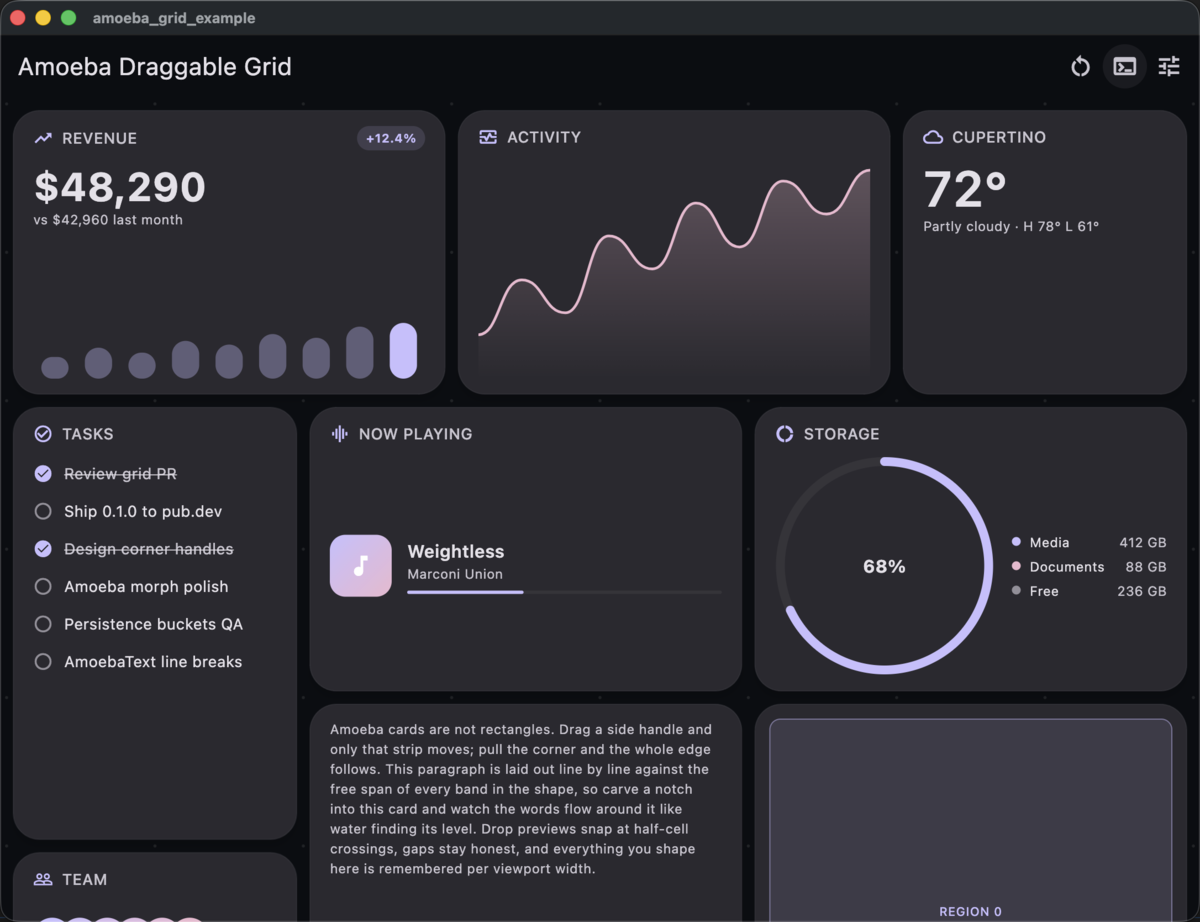
Bento-style dashboards are everywhere, but the dashboard grids behind them
are rigid: rectangles snapping into rectangles. amoeba_grid makes the
whole dashboard feel alive.
The signature move — grab a card and carry it across the dashboard: every card it crosses cedes its edge live and reverts as you pass, the field auto-scrolls when you reach its edge, and whoever you land on makes room:
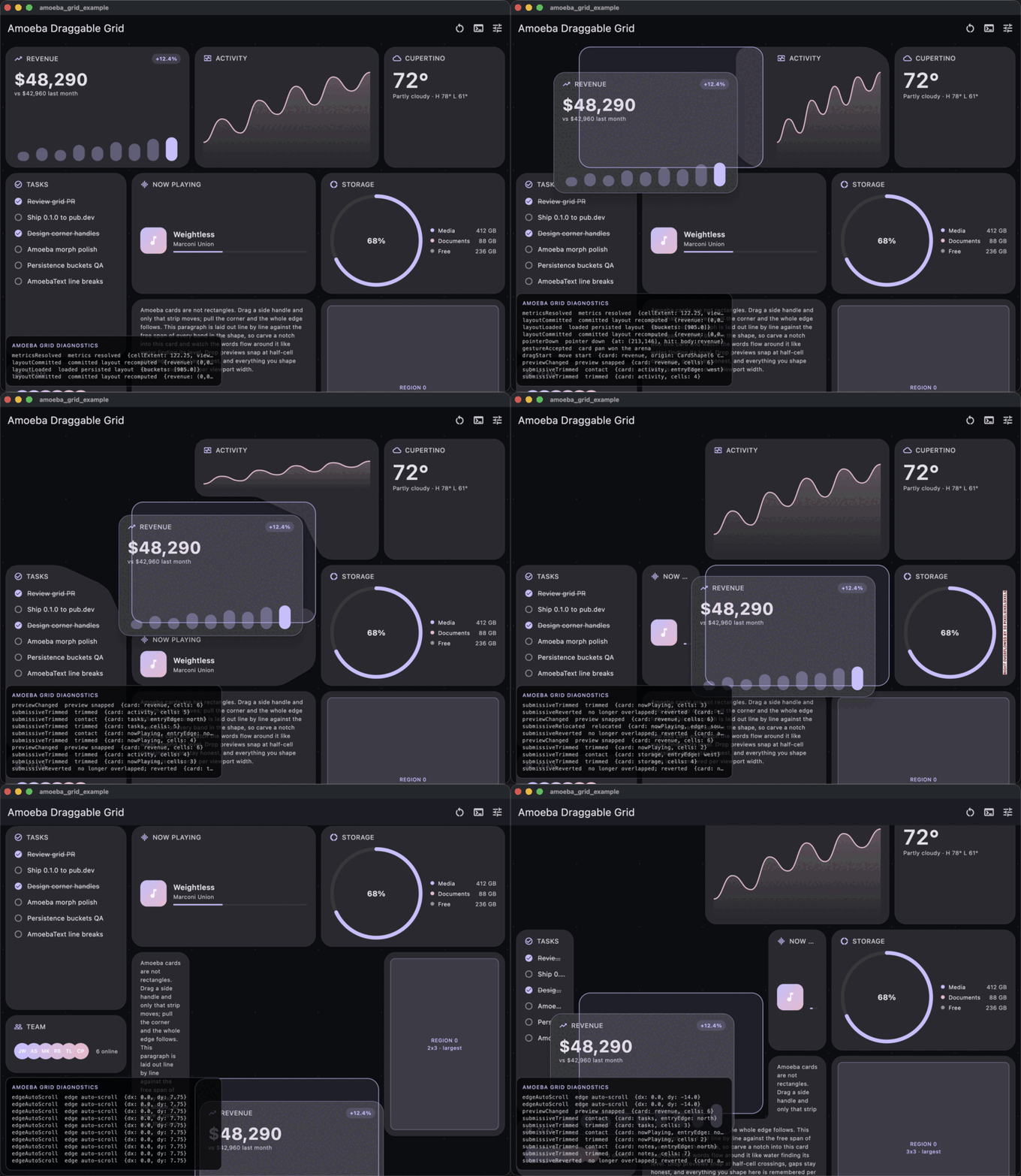
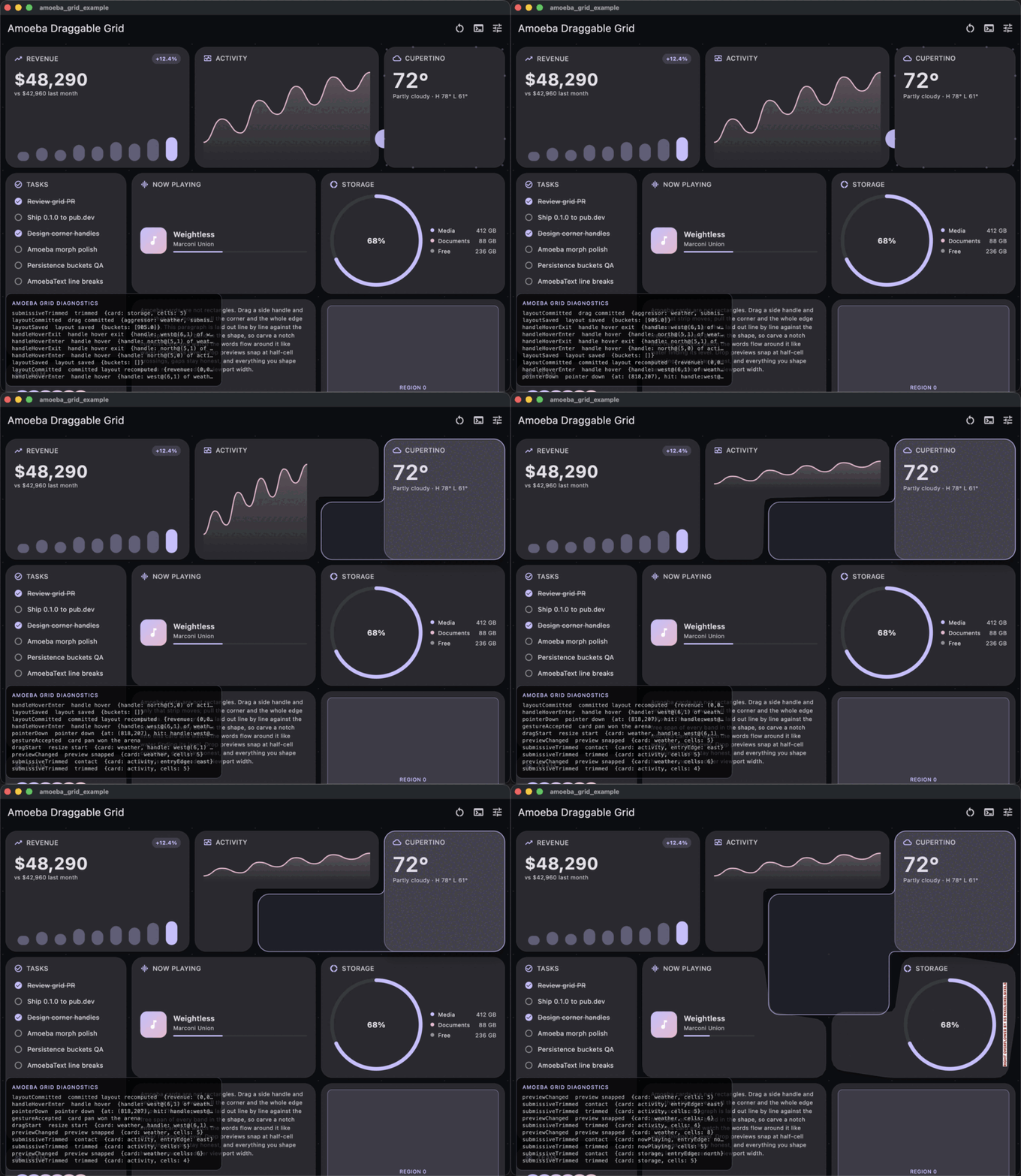
| Resize across rows and columns at once | Carve a notch into a card |
|---|---|
 |
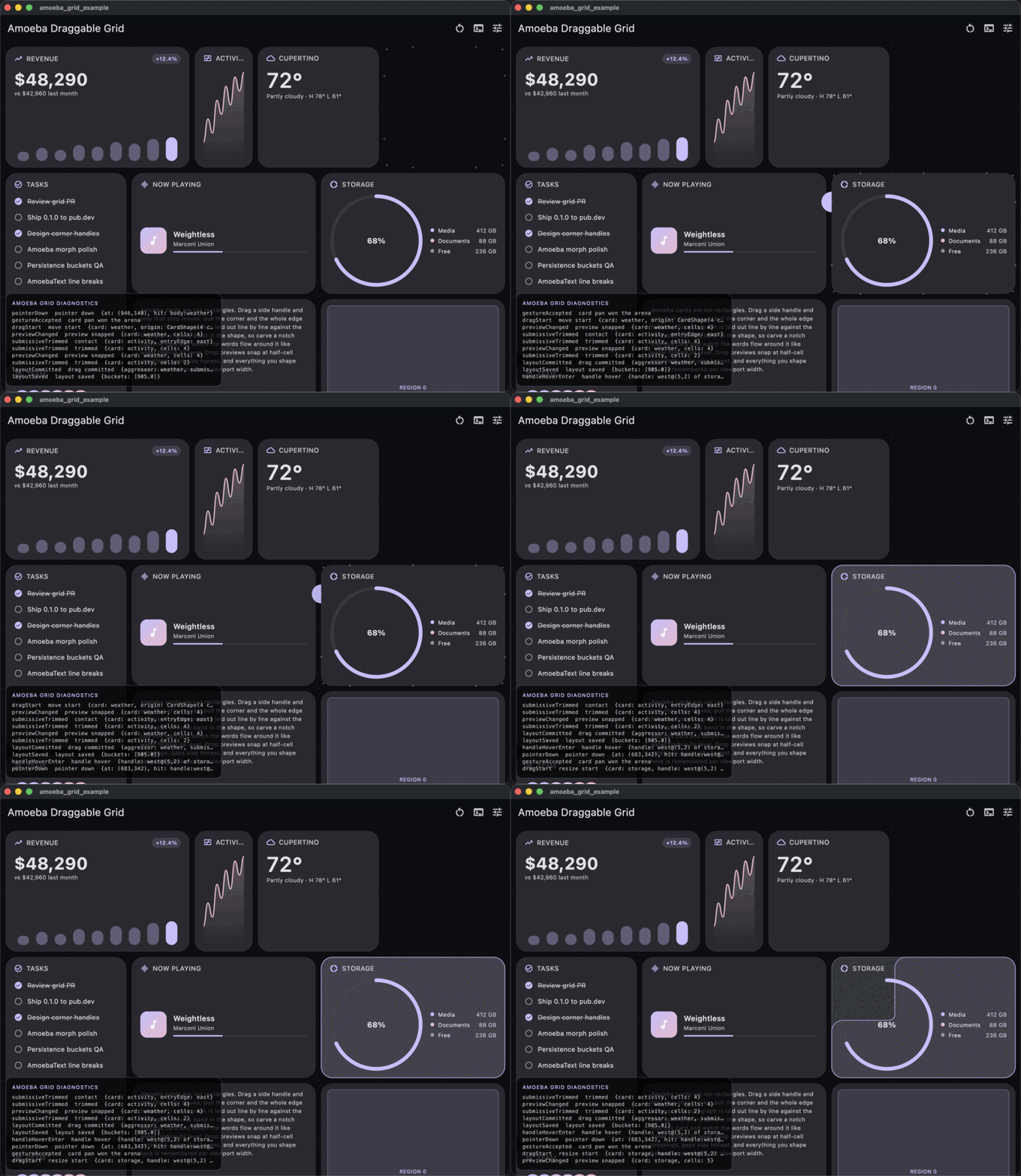 |
| One L-shaped gesture on a single side handle: two columns left, then one row down — horizontal and vertical resizing together, pushing three neighbors amoeba-style. | Side handles retract one strip at a time; the notch gets a proper inside corner radius and its own concave handle. Previews snap at 50% cell crossings. |
- Polyomino cards — outlines traced with proper inside/outside corner
radii on any silhouette, rendered with
CustomPainter, morphing organically between shapes. - Amoeba collisions — aggressor/submissive resolution: cards defer their aggressed edge while you drag, revert when cleared, commit on drop, and relocate when they'd shrink below 1x1.
- L-shaped resize gestures — drag a side handle out, then perpendicular: only the newly carved section grows.
- Hit testing that respects your eyes — whole-edge grab bands, gutter midline splits between adjacent cards, containment-first ownership, and sticky hover reveals: what you see is what you grab. Exhaustively boundary-tested.
- Fluid field — configure minimum
columns x rows; the grid grows to fill wide windows, pans in both axes when it can't, auto-scrolls at the edges mid-drag, and always keeps every card reachable. - Shape-aware content — text that wraps around notches, flows that narrow with the card, and safe areas that dodge cutouts (see below).
- Breakpoint persistence — user shaping is stored per viewport-width bucket and resolved mobile-first, through a two-method storage interface.
- Deep instrumentation — every hover, snap, trim, relocation, and
commit streams from
AmoebaGridDiagnostics; debug-only, inert in release. - Built for dashboards — bento layouts, admin panels, home-automation boards, analytics dashboards: anywhere users arrange widgets themselves.
final controller = AmoebaGridController(
  config: const AmoebaGridConfig(
    columns: 8,            // minimums — the field grows with the window
    rows: 12,
    minCellExtent: 68,
    maxCellExtent: 128,
    gap: 12,
    insideCornerRadius: 12,
    outsideCornerRadius: 24,
  ),
  storage: MyPrefsStorage(), // optional; defaults to in-memory
);

AmoebaGridView(
  controller: controller,
  cards: [
    AmoebaGridCard(
      id: 'revenue',
      initialShape: CardShape.rect(0, 0, 3, 2), // user shaping overrides this
      child: const RevenueCard(),
    ),
    // ...
  ],
);
Persistence is two methods — bring shared_preferences, a file, a server:
class MyPrefsStorage implements AmoebaGridStorage {
  @override
  Future<String?> read(String key) async => ...;
  @override
  Future<void> write(String key, String value) async => ...;
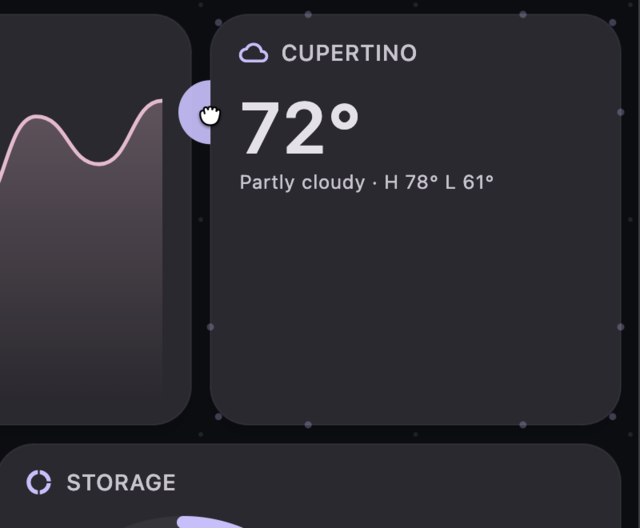
}A hover-revealed edge handle — the circle is the affordance, but the grab zone covers the entire edge plus half the gutter, and once revealed it owns the press wherever its zone reaches:
| Gesture | Result |
|---|---|
| Drag card body | Move the whole card; snapped preview at 50% crossings |
| Drag anywhere along a side edge | Extend/retract that single row/column strip |
| ...then drag perpendicular | Grow only the new section in that direction |
| Drag a corner (convex or concave) | Standard corner resize: both edge segments through the corner |
| Drag near a viewport edge | Auto-pans the field under the drag |
| Background drag / trackpad scroll | Pan the whole field in both axes |
| Esc during a drag | Cancel and revert everything |
Handles reveal progressively on hover, cover their entire edge (not just the visible circle), and once revealed they own the press wherever their zone reaches — a neighboring card can never steal the drag out from under the pointer.
Flutter's layout protocol is rectangular, so plain widgets clip at notches.
Every card's child is wrapped in an AmoebaCardScope publishing its
geometry (bands, largest inscribed rectangle, maximal-rectangle regions),
and a small widget family builds on it:
| Widget | What it does |
|---|---|
AmoebaContentArea |
SafeArea for notches: child lives in the largest rectangle inside the shape |
AmoebaRegions |
One builder call per rectangular sub-region (area-descending) |
AmoebaColumn / AmoebaRow / AmoebaFlow |
Flow children along an axis, constrained to the free span at each position |
AmoebaText |
Text that wraps band-by-band around notches (a shape-outside equivalent) |
AmoebaPadding |
Outline-aware padding: interior card edges (notches, steps) respect it too |
All degrade gracefully to plain rectangular behavior outside a card. Content lays out against the settled target shape while the morph clip animates — reshaping never causes per-frame reflow jitter.
if (kDebugMode) {
  AmoebaGridDiagnostics.enabled = true;         // inert in release builds
  AmoebaGridDiagnostics.events.listen(onEvent); // structured event stream
}
Pointer downs (and what they hit), gesture-arena outcomes, snap previews, submissive trims/relocations/reverts, commits, persistence, metrics — the demo app renders the stream as an on-screen console.
A machine-oriented reference of the full API surface, geometry model, and
interaction semantics lives in
llms.txt.
example/
is the bento dashboard shown above (macOS + web): live config sliders,
diagnostics console, shared_preferences persistence.
cd example && flutter run -d macos0.0.1 — early and opinionated. The API surface is intentionally small;
issues and PRs welcome at
SupposedlySam/amoeba_grid.