This repository is an advanced implementation of the Retrieval-Augmented Generation (RAG) framework combined with multi-agent orchestration techniques. It integrates various agentic patterns such as Planning (ReAct flow), Reflection, and Multi-Agent workflows to enhance response generation and contextual understanding.
- Introduction to RAG
- Multi Agent Orchestrator
- Advanced RAG Techniques
- Running Frontend or Backend Only
- Running the Entire Project with Docker and Docker Compose
- Project Structure
- Contributing
- License
- References
Large Language Models are trained on a fixed dataset, which limits their ability to handle private or recent information. They can sometimes "hallucinate," providing incorrect yet believable answers. Fine-tuning can help, but it is expensive and not ideal for frequent updates. The Retrieval-Augmented Generation (RAG) framework addresses this issue by using external documents to improve the LLM's responses through in-context learning. RAG ensures that the information provided by the LLM is not only contextually relevant but also accurate and up-to-date.

There are four main components in RAG:
- Indexing: Documents are split into chunks, and embeddings for these chunks are created and stored in a vector database.
- Retriever: The retriever finds the most relevant documents based on the user's query using vector similarity search.
- Augment: The retrieved documents are combined with the user query to form a prompt that provides contextual information.
- Generate: The prompt is fed into the LLM to generate an accurate and context-aware response.
This repository implements multi-agent workflows that enhance LLM capabilities through agent collaboration. It integrates:
- ReAct Flow for planning and execution
- Reflection Mechanisms to improve agent performance
- Multi-Agent Coordination for complex problem-solving
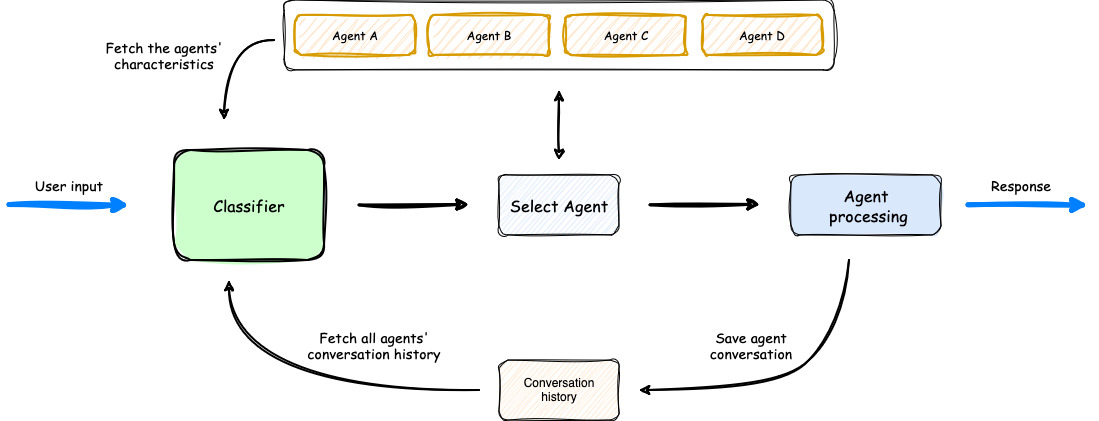
- User input is classified to determine the appropriate agent.
- The orchestrator selects the best agent based on historical context and agent capabilities.
- The selected agent processes the input and generates a response.
- The orchestrator updates conversation history and returns the response to the user.
For further exploration:
This repository supports several advanced RAG techniques:
| Technique | Tools | Description |
|---|---|---|
| Naive RAG | LlamaIndex, Qdrant, Google Gemini | Basic retrieval-based response generation. |
| Hybrid RAG | LlamaIndex, Qdrant, Google Gemini | Combines vector search with traditional methods like BM25. |
| Hyde RAG | LlamaIndex, Qdrant, Google Gemini | Uses hypothetical document embeddings to improve retrieval accuracy. |
| RAG Fusion | LlamaIndex, LangSmith, Qdrant, Google Gemini | Generates sub-queries, ranks results with Reciprocal Rank Fusion, and improves retrieval performance. |
| Contextual RAG | LlamaIndex, Qdrant, Google Gemini, Anthropic | Compresses retrieved documents to keep only the most relevant details. |
| Unstructured RAG | LlamaIndex, Qdrant, FAISS, Google Gemini, Unstructured | Handles text, tables, and images for more diverse content retrieval. |
- To run the backend separately, follow the instructions in the backend README.
- To run the frontend separately, follow the instructions in the frontend README.
git clone https://github.com/buithanhdam/rag-app-agent-llm.git
cd rag-app-agent-llmcp ./frontend/.env.example ./frontend/.env
cp ./backend/.env.example ./backend/.envand fill:
# For backend .env
GOOGLE_API_KEY=<your_google_api_key>
OPENAI_API_KEY=<your_openai_api_key>
ANTHROPIC_API_KEY=<your_anthropic_api_key>
BACKEND_API_URL=http://localhost:8000
QDRANT_URL=http://localhost:6333

MYSQL_USER=your_mysql_user
MYSQL_PASSWORD=your_mysql_password
MYSQL_HOST=your_mysql_host
MYSQL_PORT=your_mysql_port
MYSQL_DB=your_mysql_db
MYSQL_ROOT_PASSWORD=root_password

AWS_ACCESS_KEY_ID=
AWS_SECRET_ACCESS_KEY=
AWS_REGION_NAME=
AWS_STORAGE_TYPE=
AWS_ENDPOINT_URL=

# For frontend .env
NEXT_PUBLIC_BACKEND_API_URL=http://localhost:8000
docker-compose up --builddocker exec -it your-container-name bash
mysql -u root -p- Enter
root password(configured in.envordocker-compose.yml).
Run SQL queries:
CREATE USER 'user'@'%' IDENTIFIED BY '1';
GRANT ALL PRIVILEGES ON ragagent.* TO 'user'@'%';
FLUSH PRIVILEGES;
CREATE DATABASE ragagent;- Frontend:
http://localhost:3000 - Backend:
http://localhost:8000 - Qdrant: Exposes ports
6333,6334 - MySQL: Exposes port
3306
docker-compose down-
backend/: Backend source code
Dockerfile.backend: Backend container setuprequirements.txt: Backend dependencies
-
frontend/: Frontend source code
Dockerfile.frontend: Frontend container setupnext.config.js: Next.js configuration
-
docker-compose.yml: Docker Compose setup
-
Jenkinsfile: CI/CD configuration
Contributions are welcome! Please submit an issue or a pull request to improve this project.
This project is licensed under the MIT License.