Mod for Grand Theft Auto V that will help you in completing The Beast Hunt by drawing a lines from player to target checkpoint through path nodes. So you would not need to use your hearing abilities to find path nodes anymore. Beast Hunt have static path nodes between checkpoints, but selection of next checkpoint is random, so video guides aren't very helpful, but this mod is.
- Install Zig
- Run
zig buildin the root directory of the project - The output will be in
./zig-out/bin/BeastHuntHelper.dll
- Download and install latest version of ScriptHookV
- Download or build this mod as described above.
- Copy
BeastHuntHelper.dllto root of your GTA V installation directory, and change extension to.asi(e.g.BeastHuntHelper.asi). - Start the game.
- Find the last golden peyote on Saturday between 5:30 AM and 8:00 AM when the weather is foggy.
- Save the game before eating the last golden peyote, as it will start the beast hunt quest.
- Eat the last golden peyote to start the beast hunt quest. You will be transformed into a beast (Yeti/Sasquatch/Bigfoot) and the game will start tracking your path nodes and checkpoints.
- Now you'll:
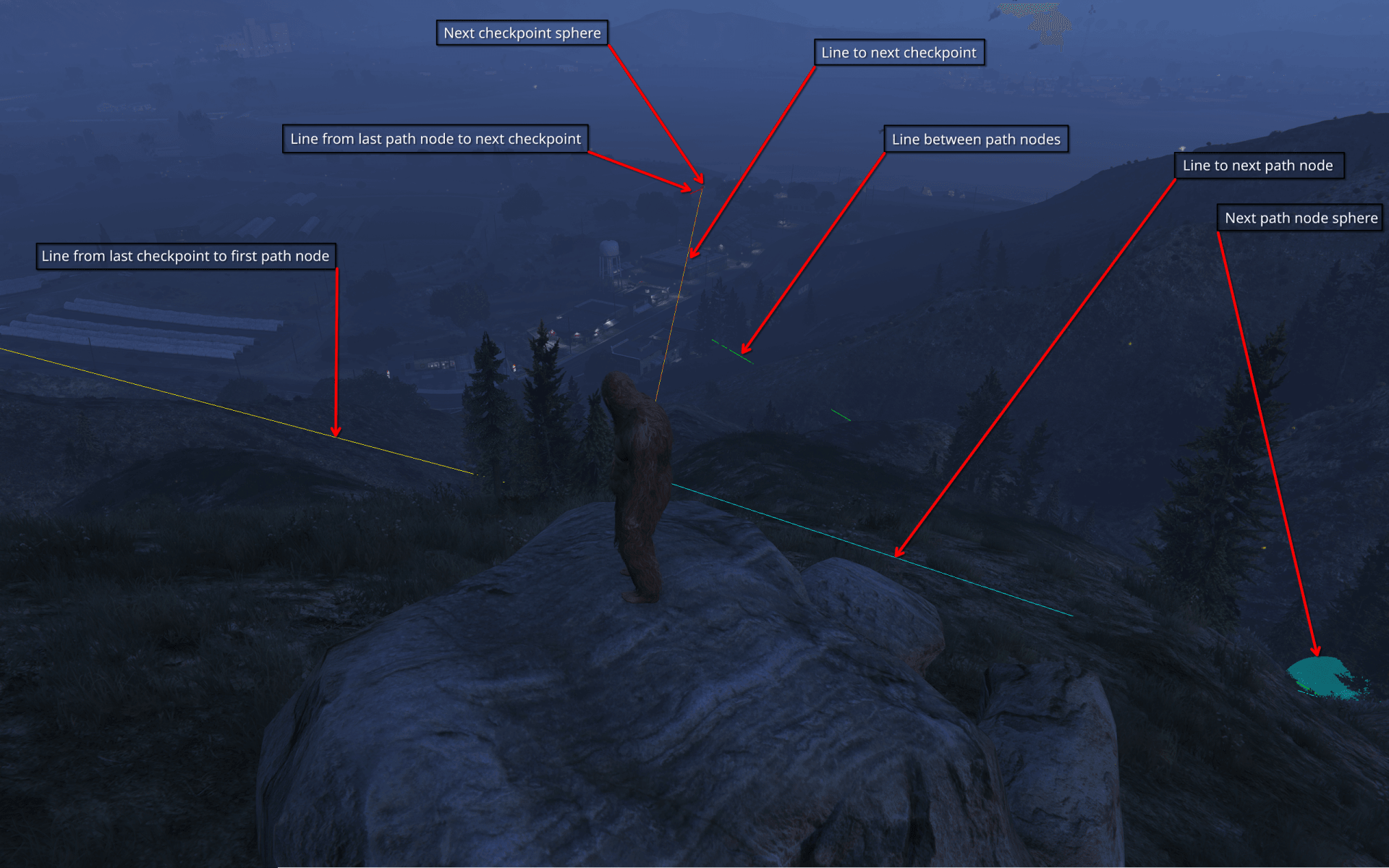
- See a couple of colored lines on the screen:
- Yellow - line from current checkpoint to the first path node.
- Green - line between path nodes.
- Red - line from last path node to the next checkpoint.
- Cyan - line from player to the next path node (that's what you should follow).
- Orange - line from player to the next checkpoint (that's what you should follow after all path nodes are done).
- Meet a couple of spheres:
- Cyan - next path node (that's where you need to go).
- Orange - next checkpoint (that's where you need to go after path nodes are done).
- See a couple of colored lines on the screen:
- Follow the cyan line to the next path node (the cyan sphere) and when no more path nodes are left, follow the orange line to the next checkpoint (the orange sphere).
- If path nodes are followed correctly up to the next checkpoint, the game will automatically progress to the next checkpoint and next set of path nodes and new checkpoint will be automatically drawn on the screen.
- If not, try to reload save and start again from step 7 (inclusive).
- Also check the troubleshooting section below.
- Repeat steps 9-10 until you reach the final checkpoint and meet The Beast, and you will have to fight it.
- Do not try to use something like God Mode as game have checks for that and will:
- Reset The Beast health to full.
- Try to drop your health.
- Make fight more difficult.
- Do not try to use something like God Mode as game have checks for that and will:
- After defeating The Beast, you will be able to return to the normal world and continue playing the game.
Beast script is very fragile don't do nothing unusual, just follow the line and that's all. Also, this mod has it's own state which tracks the progress between checkpoints, a.k.a. path nodes, as it's very hard to completely hook script state as not everything this mod needs is stored in global variables.
- Open
<game folder>/update/update2.rpfin OpenIV - Extract
x64/levels/gta5/script/script_rel.rpffromupdate2.rpf - Open
script_rel.rpfin OpenIV - Extract
player_controller.ysc - Open
player_controller.yscin ImHex and patch 5th byte from 0x0C to 0x0A - Export modified
player_controller.yscin OpenIV - Decompile exported
player_controller.ysc.fullusing GTA-V-Script-Decompiler - Search for regex patterns to find offsets:
- iSPInitBitset:
\(Global_(\d+)\.f_(\d+)\.f_(\d+), 7\) && !(?:IS_BIT_SET|BitTest)\(Global_\1\.f_\2\.f_\3, 8\)- Sum of all 3 captured numbers is the offset
- vBHCheckpoints:
Global_(\d+)\[0 \/\*3\*\/]\.f_2 = 149\.05f;- First captured number is the offset
- iBHPathIndexes:
return Global_(\d+)\[\*uParam1 \/\*12\*\/]\[\*uParam2];- First captured number is the offset
- Usually it's
vBHCheckpointsoffset + 463
- sBHPath:
{ Global_(\d+)\[(?:num3|iVar2) \/\*14\*\/]\.f_1\[\(?iParam1 - 1\)? \/\*3\*\/] };- First captured number is the offset
- Usually it's
iBHPathIndexesoffset + 266
- iSPInitBitset:
Feel free to open issues or pull requests if you have any suggestions or improvements.
But remember: Talk is cheap, send patches.